What the castle is made of
The creatures are on the sprites page. These are the other half: the pieces a room is furnished with -- door frames, a clock, a bookcase, a skeleton in chains -- and the two character sets. They are a different shape from a sprite. A creature is always two bytes wide and stores only a row count; these carry a width as well, and are drawn by different code. Which format applies is decided by the sprite code rather than by anything in the bytes: above $A1 is furniture. Each is drawn in its own colours. Those are a second table, running alongside the graphics one and in the same format -- one attribute per character cell rather than one byte per eight pixels. It is what separates the four locked doors below: one picture between them, and four colour tables. $FF in one of those tables is not a colour. The real values are $00, $07 and $42 to $47; $FF means leave this cell as it is, so the pixels are drawn and the cell keeps whatever the room painted there. That is how a doorway is drawn in the colour of the wall it is cut into. On this page there is no room to take a colour from, so those cells are drawn bright white on black -- four of the graphics are nothing but $FF, and would otherwise show as nothing at all. 34 of them. The names are pobtastic's, from the Atic Atac disassembly at skoolkit.arcadegeek.co.uk; the ones still shown by number are unnamed here.
The title screen
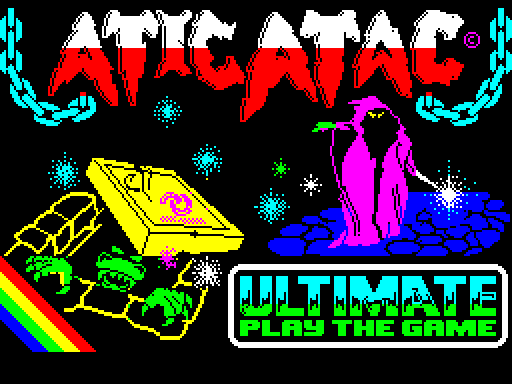
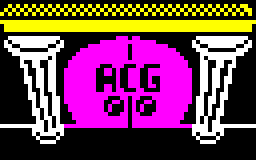
It is not in the game. The game's memory holds no title picture at all -- what was written up here as one turned out to be the status panel. The picture everybody remembers is a plain screen$ block, the second thing on the tape: 6912 bytes loaded straight to $4000 and shown while the 30K behind it loads. So it is the one graphic in this disassembly that no game code ever draws, and the only one in full colour. the loading screen
The furniture
Picture Code What it is Size Graphic Colours
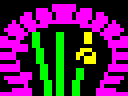
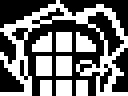
gfxpageA2 $A2 Cave door frame 32×24 GFX_A2 ATTRS_C9 — every cell takes the room's colour; shown white here
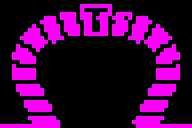
gfxpageA3 $A3 Door frame 32×24 GFX_A3 ATTRS_CA
gfxpageA4 $A4 Big door frame 48×32 GFX_A4 ATTRS_CB
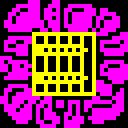
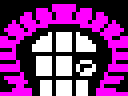
gfxpageA9 $A9 Door, locked, red 32×24 GFX_A9 ATTRS_D0
gfxpageAA $AA Door, locked, green 32×24 GFX_A9 ATTRS_D1
gfxpageAB $AB Door, locked, cyan 32×24 GFX_A9 ATTRS_D2
gfxpageAC $AC Door, locked, yellow 32×24 GFX_A9 ATTRS_D3
gfxpageAD $AD Cave door, locked, red 32×24 GFX_AD ATTRS_D4 — 8 of 12 cells take the room's colour, shown white
gfxpageAE $AE Cave door, locked, green 32×24 GFX_AD ATTRS_D5 — 8 of 12 cells take the room's colour, shown white
gfxpageAF $AF Cave door, locked, cyan 32×24 GFX_AD ATTRS_D6 — 8 of 12 cells take the room's colour, shown white
gfxpageB0 $B0 Cave door, locked, yellow 32×24 GFX_AD ATTRS_D7 — 8 of 12 cells take the room's colour, shown white
gfxpageB1 $B1 Clock 32×32 GFX_B1 ATTRS_D8
gfxpageB2 $B2 Ghost picture 32×24 GFX_B2 ATTRS_D9 — every cell takes the room's colour; shown white here
gfxpageB3 $B3 Table 32×22 GFX_B3 ATTRS_DA
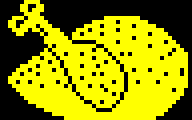
gfxpageB4 $B4 Roast chicken, whole -- the health indicator 48×30 GFX_B4 no table — it takes the colour of whatever it is drawn on
gfxpageB5 $B5 Roast chicken, picked to the bones 48×30 GFX_B5 no table — it takes the colour of whatever it is drawn on
gfxpageB6 $B6 Wall antlers 32×16 GFX_B6 ATTRS_DD
gfxpageB7 $B7 Wall trophy 16×16 GFX_B7 ATTRS_DE
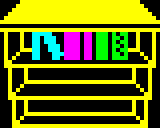
gfxpageB8 $B8 Bookcase 40×32 GFX_B8 ATTRS_DF
gfxpageB9 $B9 Trapdoor, closed 32×32 GFX_B9 ATTRS_E0
gfxpageBA $BA Trapdoor, open 32×32 GFX_BA ATTRS_E1
gfxpageBB $BB Barrel 32×32 GFX_BB ATTRS_E2
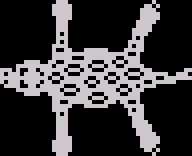
gfxpageBC $BC Rug 48×39 GFX_BC ATTRS_E3
gfxpageBD $BD A.C.G. shield 16×16 GFX_BD ATTRS_E4
gfxpageBE $BE Wall shield 16×16 GFX_BE ATTRS_E5 — every cell takes the room's colour; shown white here
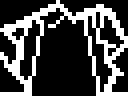
gfxpageBF $BF Suit of armour 16×32 GFX_BF ATTRS_E6
gfxpageC1 $C1 Door, shut 32×24 GFX_C1 ATTRS_E8
gfxpageC2 $C2 — 32×24 GFX_A3 ATTRS_CA
gfxpageC3 $C3 Cave door, shut 32×24 GFX_C3 ATTRS_EA — 8 of 12 cells take the room's colour, shown white
gfxpageC4 $C4 — 32×24 GFX_A2 ATTRS_C9 — every cell takes the room's colour; shown white here
gfxpageC5 $C5 A.C.G. door 64×40 GFX_C5 ATTRS_EC — 4 of 40 cells take the room's colour, shown white
gfxpageC6 $C6 Pumpkin picture 32×16 GFX_C6 ATTRS_ED
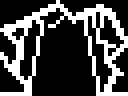
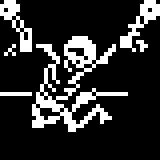
gfxpageC7 $C7 Skeleton 40×40 GFX_C7 ATTRS_EE — 13 of 25 cells take the room's colour, shown white
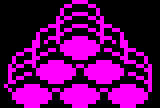
gfxpageC8 $C8 Barrel stack 40×27 GFX_C8 ATTRS_EF
The status panel
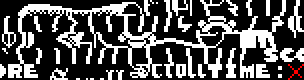
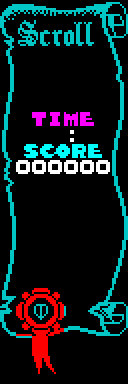
The 94 characters below are not a font in any useful sense -- they are one picture cut into cells. DRAW_PANEL points the tile source at them and draws 8 columns by 24 rows from a 192-byte map of which piece goes where, so the parchment scroll down the side of the screen is stored as a little character set and an index. This is the routine's own output, captured off the screen: the map holds tile numbers rather than addresses, so there is nothing for an image macro to point at. the status panel
The text font
59 characters, $20 to $5A -- space, digits, punctuation and capitals, and nothing else. The code never names this address: it loads $BE4C, which is this block less $20 characters, so a character's own code indexes it. fontBF4C

The status panel's character set
94 characters, used with a 192-byte map of which piece goes in each of the panel's 8 by 24 cells. The scroll is a little character set and an index, not a bitmap. fontB03A